Agents, part 3: operating an agent harness (OpenClaw as a worked example)
How do I run an agent day to day: sessions, permissions, skills, memory, schedules, recovery and observability?
Building an agent loop is one job; keeping an agent useful for months is another. Once an agent runs on its own schedule, talks to several channels and keeps memory, the questions change: which conversation is this, who may ask for what, where does a command run, what survives a restart, and how would I know something went wrong?
Series: 1 · How agents work → 2 · Skills and harnesses → 3 · Operating an agent harness.
Each section below states a general operating principle first, then shows how one open-source harness, OpenClaw, implements it (in a quoted paragraph marked In OpenClaw). OpenClaw is the worked example, not the subject: the same questions apply to any persistent agent runtime. Version-specific commands and the exact documentation snapshot are in Current options.
Key points
- Treat a running agent as a service with eight operating concerns: sessions, tools, permissions, skills, memory, scheduling, recovery and observability.
- Separate three questions that are often merged: who can ask, which actions can run, and where those actions execute.
- An approval prompt reduces accidents; it is not an authentication boundary or a sandbox.
- Memory, compaction, checkpoints and skills are different mechanisms; diagnose them separately.
- A schedule needs a duplicate policy and a delivery record, not just a timer.
- After any restart, the agent should re-inspect the world before continuing, because the record of what it did can be behind what actually happened.
- Log enough structured events (run, session, tool call, approval, outcome, delivery) to answer “what happened?” without reading a transcript.
The operating concerns at a glance
| Concern | The question it answers | What to inspect when it goes wrong |
|---|---|---|
| Sessions | Which conversation and history does this message belong to? | Session key, reset policy, queue of pending turns |
| Tools | What actions exist for this agent? | Effective tool list for the session, not the configured one |
| Permissions | Who may ask, and which actions need approval? | Sender access, tool policy, approval records |
| Execution boundary | Where does an action actually run? | Host versus sandbox versus remote device; mounted files |
| Skills | Which procedures are available, and which version? | Source precedence, eligibility, revision |
| Memory and context | What does the agent know at the start of a turn? | Loaded memory files, compaction summaries |
| Scheduling | What runs without a human message? | Job definitions, run history, delivery outcome |
| Recovery and observability | What happens after interruption, and how do we know? | Structured logs, run identifiers, restart records |
Follow one request through the system
A persistent harness typically has a long-running gateway that receives messages from channels (chat apps, a web UI, a terminal), routes each to a session, and runs the agent loop for that session inside a workspace with some set of tools. Following one request through these stages is the fastest way to localize a failure: a channel can be connected while model access fails; a model can answer while a required command is missing from the execution environment; a skill can be installed but ineligible. “The bot is online” distinguishes none of these.
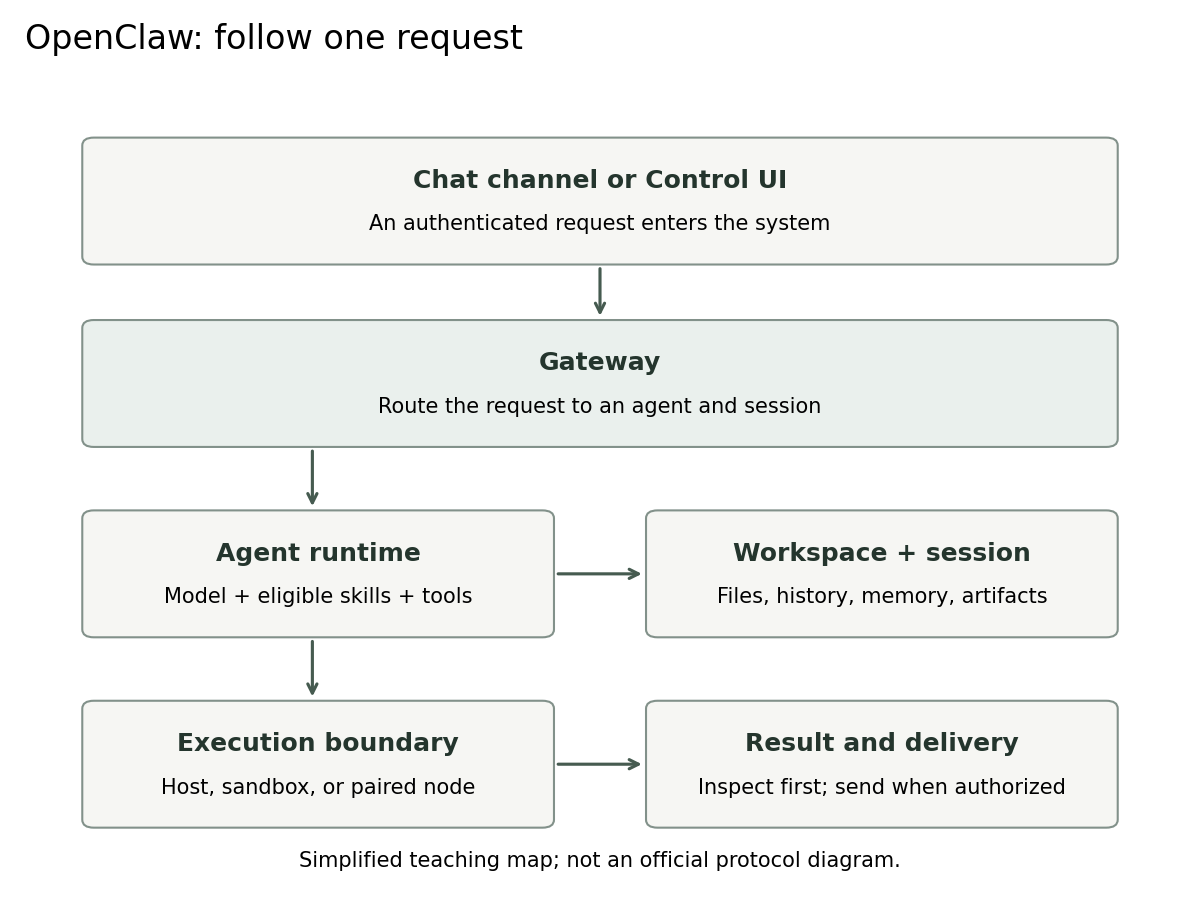
In OpenClaw. The Gateway is the persistent service joining channels, clients and runtime operations; a session identifies the conversation and execution history; a workspace holds the files; skills supply procedures and tools provide actions; a paired node can expose capabilities on another device. The agent loop is documented as a serialized, per-session run: intake, context assembly, model inference, tool execution, streaming and persistence. [1, 11]
Sessions: identity, ordering and reset
Principle. Every incoming message must resolve to exactly one session, and turns within one session must not interleave. Two simultaneous turns writing to the same history will corrupt it. Decide deliberately when a session ends: a session that never resets accumulates stale context; one that resets too often forgets work in progress.
What to decide: how a sender and channel map to a session (one per direct conversation, per group, per thread); what happens to a message that arrives while a turn is running (queue it, merge it, or interrupt); and the reset policy (manual, daily, or after inactivity).
In OpenClaw. Turns are serialized per session before global capacity is admitted, and each run records a writer claim so a superseded run cannot commit stale transcript data. Sessions are reused by default until reset; operators can opt into a daily reset at a configured hour or an idle reset after a number of minutes, per chat type or channel, and
/newor/resetstarts a new session manually. Background events such as scheduled runs do not count as activity for idle resets. [11, 12]
Tools, permissions and the execution boundary
Principle. Three questions must have separate answers:
- Who can ask? Sender authentication and pairing decide whose messages reach the agent.
- Which actions can run? A tool policy decides which tools exist for a session; an approval policy decides which calls need a human “yes”.
- Where do they run? On the gateway host, in a sandbox, or on a paired remote device. This decides what a successful action can damage.
An authenticated sender has passed the first check. That does not make every instruction inside a web page they ask the agent to read authoritative; content fetched by a tool is data, and indirect prompt injection is the standard way that line gets crossed. [17] Approval prompts reduce accidental execution, but once approved, a command acts with the full permissions of wherever it runs. Least privilege therefore lives in the execution boundary and in scoped credentials, not in the prompt.
A practical policy for a first deployment: read-only tools without approval; writes restricted to one workspace; anything that sends, publishes, deletes or spends money behind approval; secrets held by tools, never pasted into prompts or skills; and a sandbox for any agent that browses untrusted content.
In OpenClaw. The documentation treats one Gateway as one trust boundary: authenticated callers are trusted operators, and multiple agents or sessions on one Gateway do not isolate mutually adversarial users. Exec approvals are enforced on the execution host and bind the exact context of an approved command (working directory, argument list, resolved executable), but the documentation states they are not a per-user authentication boundary or a read-only policy. Tool availability and command approvals are separate settings. Sandboxing is off by default; enabling it moves tool execution into a sandbox backend while the Gateway stays on the host. [4, 5, 13]
Skills: availability, precedence and versions
Principle. For every skill an agent uses, you should be able to answer: which copy was loaded, from which source, at which revision, and is it eligible to run here (its required binaries, files and credentials exist where execution happens). When two sources define the same skill name, a precedence rule decides; know it before debugging “my edit has no effect”. How skills are structured and tested is covered in part 2.
In OpenClaw. File-backed skills load from a documented list of sources with workspace skills at the highest precedence and bundled skills near the lowest; the highest source wins on a name collision. Skills can be gated by eligibility, and the CLI lists eligible skills and checks missing prerequisites. File-backed skills, managed library revisions and Workshop-learned skills follow different refresh rules, so a running session may not see an edited file immediately. [2, 6]
Memory and context: what the agent knows at the start of a turn
Principle. Keep four things apart. Context is what is in the current request. Compaction replaces older turns with a summary so a long session fits the window. Memory carries selected facts across sessions. Checkpoints record execution progress so work can resume. A useful memory entry is durable, sourced and dated (“prefer primary papers; observed 2026-11-03”); an unresolved guess should never become a permanent fact, and a changed preference should supersede the old one rather than sit beside it. Evidence about the world (“source B was unreachable on Tuesday”) is not a preference and expires.
In OpenClaw. Memory is split into files with different roles:
USER.mdfor stable preferences and directives,MEMORY.mdfor durable non-profile facts and decisions, and datedmemory/YYYY-MM-DD.mdnotes for running observations, with recent daily notes loaded on a new session. Compaction summarizes older turns while keeping recent messages intact, keeps each tool call paired with its result, and leaves the full history on disk; it changes only what the model sees next. [7, 14]
Scheduling: work without a human message
Principle. A recurring job needs more than a timer. Before scheduling, write down: timezone; input scope; output destination; whether it runs in an existing session (with its context) or a fresh one; budget; behavior when inputs are missing; and a duplicate policy. A scheduler can fire twice, and a delivery can fail after the work succeeded. Give each run a stable period key (for example the intended week plus the source-set revision), store the artifact identity and the delivery receipt, and check for an existing receipt before sending. Record execution and delivery as separate outcomes: “ran but could not deliver” and “never ran” need different fixes.
Validate a job manually first, then schedule it as draft-only, inspect the first run, and only then allow delivery.
In OpenClaw. Scheduled jobs, webhooks and other triggers are managed as automations, which persist jobs, wake the agent, and deliver output to a channel, a webhook or nowhere; jobs have their own run history. Earlier releases had a separate heartbeat monitor; the current documentation describes migrating those monitors into ordinary automation jobs. [8, 9]
Recovery: interruptions, restarts and upgrades
Principle. Assume any step can be interrupted: a process restart, a timeout, a lost connection. Recovery has two rules. First, after an interruption the agent should inspect the current state (files, processes, external records) before continuing, because the saved record can lag what actually happened. Second, an action whose result is unknown must not be blindly repeated; reconcile first, or use an idempotency key. Upgrades are a planned interruption: back up state with the documented method, read migration notes, upgrade a test instance where you can, and rerun a fixed acceptance task. Replacing a binary may not undo a state migration, so keep a restorable backup.
In OpenClaw. A graceful Gateway stop writes a small marker for each running root session; at startup the Gateway sends the agent one input asking it to check current files, processes, sub-agents and external actions before continuing. Child runs do not resume independently. The update guide asks for a verified backup before significant updates and distinguishes package updates from state migrations and recovery. [10, 12]
Observability: answering “what happened?”
Principle. A transcript is not a log. For each run, record as structured events: a run identifier, session, trigger (message, schedule, webhook), model and settings, each tool call with arguments (secrets redacted), approval decisions, errors, token and cost usage, the final status, and the delivery outcome. With those fields you can answer most operational questions with a query: which runs failed last night, which tool is slowest, which approvals are most frequent, which job delivered twice. OpenTelemetry maintains semantic conventions for generative-AI telemetry (spans, metrics and events for model clients and MCP), which is a reasonable starting vocabulary if you already use tracing. [16]
In OpenClaw. The Gateway writes rolling log files with one JSON object per line and supports redaction;
openclaw logstails them, including remotely. Sessions can be listed as JSON, and in a chat/statusshows context usage and model while/context listshows what is in the system prompt. A run’s wait result reports its status and, when available, a receipt confirming the reply reached the source conversation.openclaw doctorruns health checks and guided repairs. [11, 12, 15]
Learned procedures are code changes
Some harnesses can write or revise their own skills from experience. Treat a learned procedure like a pull request: review its scope, compare it against earlier failures, rerun a relevant request, an irrelevant request and a previously failing case, and keep a rollback path. A good lesson is “when a PDF is unavailable, keep the verified metadata and mark the missing result”; a bad one is “always trust this website”, inferred from one successful run. None of this changes the model’s weights.
In OpenClaw. The Skill Workshop saves the previous version before each change and supports undo; a proposal mode lets background learning save a draft for review instead of applying it. [6]
Diagnose from symptoms
| Symptom | Inspect first | What to avoid |
|---|---|---|
| A message never reaches a run | Channel access, pairing, routing, gateway status | Rewriting the skill before checking delivery |
| A skill is missing | Selected workspace, source precedence, eligibility | Assuming installation means activation |
| A command works on the host but fails in a task | Actual execution host, dependencies, mounted files | Adding broad permissions to fix a missing binary |
| Old instructions keep appearing | Session selection, skill revision and refresh rules | Editing a different copy with the same name |
| The agent forgets a decision | Saved memory, compaction summary, loading limits | Repeating the whole transcript in every prompt |
| A scheduled job produces duplicate output | Run history, trigger identity, delivery receipts | Retrying an uncertain send blindly |
These are troubleshooting hypotheses; confirm them in logs and effective settings.
An operating checklist
Before the first run: one user, one workspace, one model connection; tool policy written down; sandbox decided; secrets held by tools; a small acceptance task with a known correct output (the literature digest from part 1 works well).
Before scheduling: the task passes manually; duplicate policy and period key defined; delivery tested in a private channel; budget set; failure notification goes to a human.
Every week: read failed runs and approval logs; prune or supersede stale memory; review learned or updated skills; check that disk, logs and costs are within expectations.
Before every upgrade: verified backup; release and migration notes read; acceptance task rerun on the new version; rollback path confirmed.
Current options, checked 6 November 2026
What was checked. OpenClaw’s official documentation at source commit 27f243756a45f02724b70597803571e2f0e1d020 (the main branch on 6 November 2026; package version 2026.11.1, which is also the latest stable release tag, with a 2026.11.5 beta tagged). The previous version of this article used commit 34bc643; comparing the cited pages, the changes since are small (Quick start now offers to keep the Gateway running in the background and adds openclaw gateway start, which waits for readiness; a skill hidden from model selection can now appear in the $ picker; rollback keeps later independent changes). The commands below were checked against the documentation; an authenticated OpenClaw deployment was not run for this article. Check your installed version before using them. [1–15]
Code · Bash · 10 lines
openclaw --version
openclaw gateway status
openclaw dashboard
openclaw skills list --eligible
openclaw skills check
openclaw security audit
openclaw sessions --json
openclaw automations list --all
openclaw logs --follow
openclaw doctor
dashboard opens the web interface; it does not verify a task. skills check reports missing prerequisites. security audit reports configuration concerns; it does not prove that every plugin or workflow is safe. automations list shows enabled jobs, and --all includes disabled ones; openclaw cron remains an alias. None of these commands installs third-party skills or schedules work. [2, 3, 8, 12, 15]
First skill. To try the paper-digest skill from part 2, place it under the workspace’s skills/ directory, confirm it is listed as eligible, ask for it explicitly once, then send an unrelated request and confirm it is not applied. [2]
Further reading
- OpenClaw, Gateway architecture and Agent loop: a detailed, public description of how a persistent harness runs a turn. [1, 11]
- OpenClaw, Exec approvals: an unusually explicit statement of what approvals do and do not protect. [13]
- OWASP, LLM01:2025 Prompt Injection: why “who can ask” and “what content says” must be separated. [17]
- OpenTelemetry, GenAI semantic conventions: a shared vocabulary for agent telemetry. [16]
- Anthropic, Effective harnesses for long-running agents: designing state so a new session can resume. [18]
References
OpenClaw references 1–15 are official documentation pinned to source commit 27f2437 (6 November 2026). They describe that snapshot; check the documentation for your installed release.
- OpenClaw contributors, “Gateway architecture.” Document.
- OpenClaw contributors, “Skills” and skills CLI reference. Loading and refresh, CLI.
- OpenClaw contributors, “Getting started.” Document.
- OpenClaw contributors, “Security.” Document.
- OpenClaw contributors, “Sandboxing.” Document.
- OpenClaw contributors, “Skill Workshop.” Document.
- OpenClaw contributors, “Memory overview.” Document.
- OpenClaw contributors, “Automations” and automations CLI reference. Document, CLI.
- OpenClaw contributors, “Heartbeat migration.” Document.
- OpenClaw contributors, “Updating.” Document.
- OpenClaw contributors, “Agent loop.” Document.
- OpenClaw contributors, “Session management” and sessions CLI reference. Document, CLI.
- OpenClaw contributors, “Exec approvals.” Document.
- OpenClaw contributors, “Compaction.” Document.
- OpenClaw contributors, “Gateway logging,” logs CLI and doctor CLI references. Logging, logs CLI, doctor CLI.
- OpenTelemetry contributors, “Semantic Conventions for Generative AI,” repository, accessed 6 November 2026. Repository.
- OWASP Gen AI Security Project, “LLM01:2025 Prompt Injection,” OWASP Top 10 for LLM Applications 2025. Entry.
- Anthropic, “Effective harnesses for long-running agents,” 26 November 2025. Article.